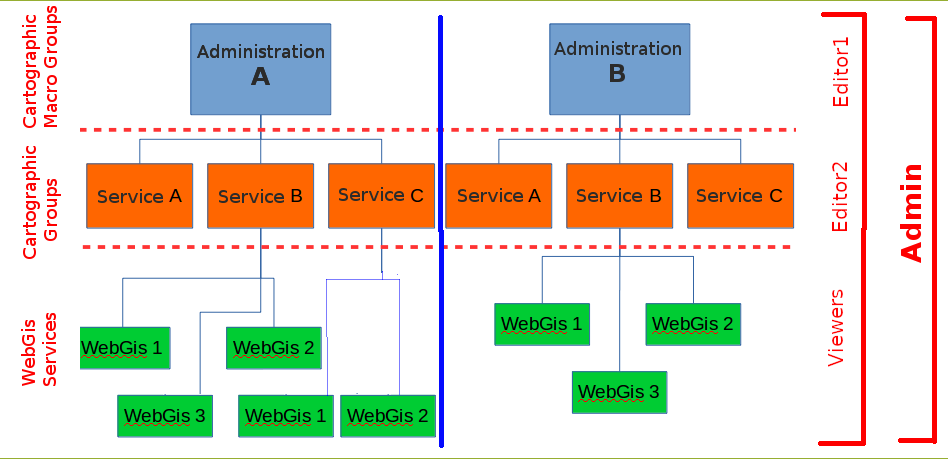
Hierarchical organization of WebGis services and types of Users (roles)
This paragraph allows you to understand how G3W-SUITE makes it possible to manage the individual WebGis services in a structured and hierarchical way.
In G3W-SUITE it is possible to organize WebGis services on two thematic/functional levels
Cartographic MacroGroupsCartographic groups
These organizational levels can be associated with different types of users (Editor 1, Editor2 and Viewer) in order to manage the access/management powers to the individual elements in a granular way.
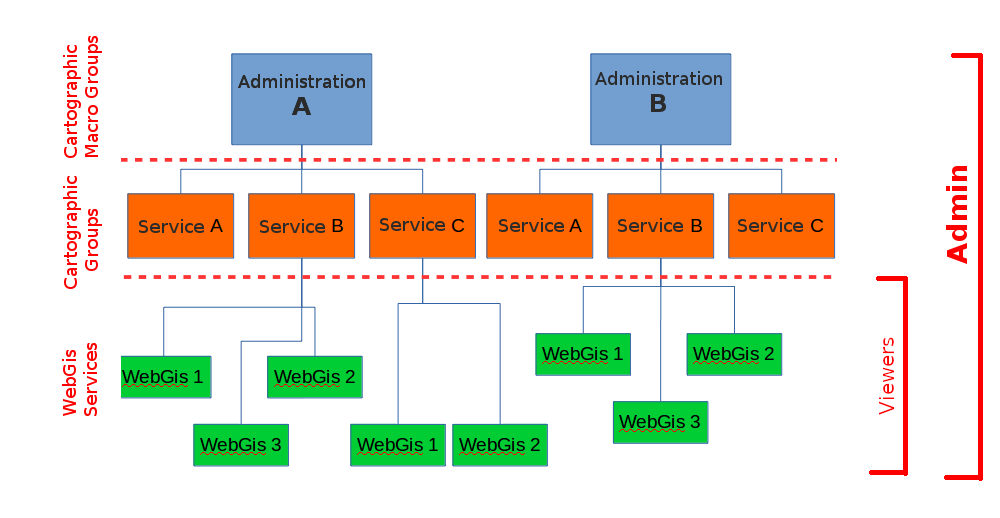
The following image shows an example of the functional use of these organizational levels within a Union of Municipalities.
Access policies and individual functional modules may be associated with each WebGis service.
Types of Users (Roles)
In G3W-SUITE you can create Users and Users Groups and associate them with specific roles:
Admin: If the “Staff status” option is also active for this user, the administrator can also access the session of Django administration (basic configuration of the suite)Editor1*: administrator of one or more Cartographic MacroGroups for which it will be possible:create users and/or user groups
create Cartographic Groups and, if necessary, assign them to an Editor 2 user
publish WebGis services and define their access policy
activate and configure some functional modules
Editor2: administrator of one or more Cartographic Groups for which it will be possible:publish/update WebGis services and define their access policy
activate and configure some functional modules
Viewer: user with access permission in consultation on WebGis services characterized by authentication. This user can also use individual functional Modules if the relative permissions have been attributed to himAnonymus User: user to be associated with WebGis services and/or functional modules with free access
Pay attention: The use of the Editor1 user and MacroGroups is recommended only in specific cases or when you want to manage autonomous work environments (e.g. single Public Administrations) in a multi-environment context (e.g. Union of Public Administrations).
In this case the individual Editor1 users will be associated with cartographic Macrogroups and will manage users and contents completely independently from those of other Macrogroups associated with other Editor1 users.
Hierarchical organization of contents
The following paragraph is dedicated to better understanding the relationships between the different types of users and the different elements of the suite (MacroGroups, Map Groups, WebGis services …).
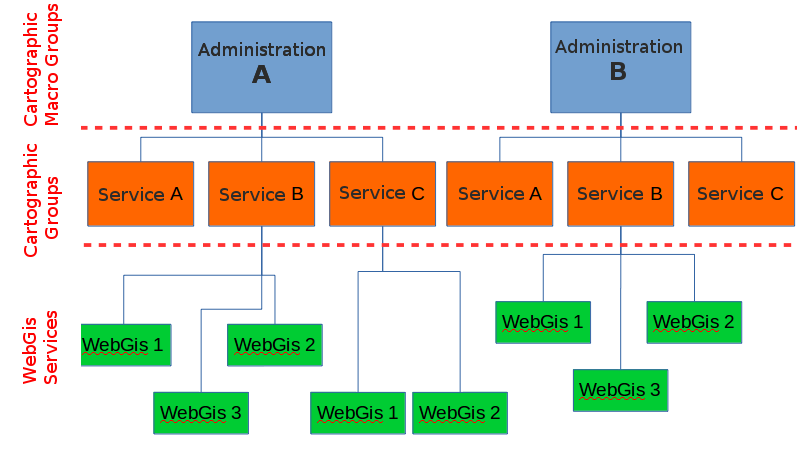
In G3W-SUITE it is possible to manage Webgis services in a more or less structured way
an organizational level (Cartographic Groups):
two organizational levels (MacroGroups and Cartographic Groups)
These hierarchical levels can be used for organizational purposes (thematic containers) and/or functional (containers managed by different users/roles).
It is in fact possible to associate the two types of containers (MacroGroups and Cartographic Groups) to users with different roles/powers (Editor1 and Editor2) who will thus become the Administrators of all their contents.
In particular Editor1 users will also be able to create/manage users who can be associated with the Cartographic Groups and WebGis services present in the reference MacroGroup.
The cases relating to one or two organizational levels will be better described below.
One organization level (absence of MacroGroups)
If MacroGroups are not needed, the Admin user will be the only administrator of the suite and can therefore:
create users (individuals and/or groups) of various types
create Cartographic Groups
publish WebGis services within the individual Cartographic Groups
activate some specific modules on individual WebGis services
When creating a cartographic group, the Admin user can define:
the eventual user (individual/group) Editor 2 to associate the Group with
Viewers users (individuals/groups) who will have access to this container
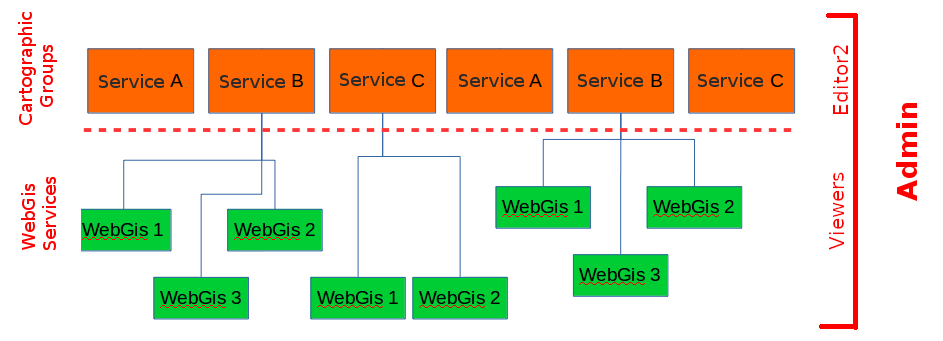
In the event that the Cartographic Group is assigned to Editor 2 (single or group users), they will may autonomously publish/update WebGis services inside in this container.
Editor 2 users will also be able to define the access policies to the published WebGis services, limited to the Viewers users associated with the Cartographic Group by the Admin user.
Even the Admin user can publish WebGis services within a Cartographic Group and, if necessary, associate them with a user (single and/or group) of Editor 2 type.
Two organization levels (presence of MacroGroups)
Macrogroups can be created only by Admin users.
Each Macrogroup can be associated with only one Editor1 user.
Each MacroGroup can be considered as a watertight compartment within which the associated Editor 1 user (administrator of the MacroGroup), will be able to create users and user groups that will be made available to define access permissions for content (Groups Maps, WebGis services, functional modules …) of the reference MacroGroup only.
In this way it will be possible to create totally independent entities, the MacroGroups, which will be managed exclusively by the user Editor 1 associated with them.
Clearly the Admin users (1 and 2) will continue to have full powers on all groups present in the system.
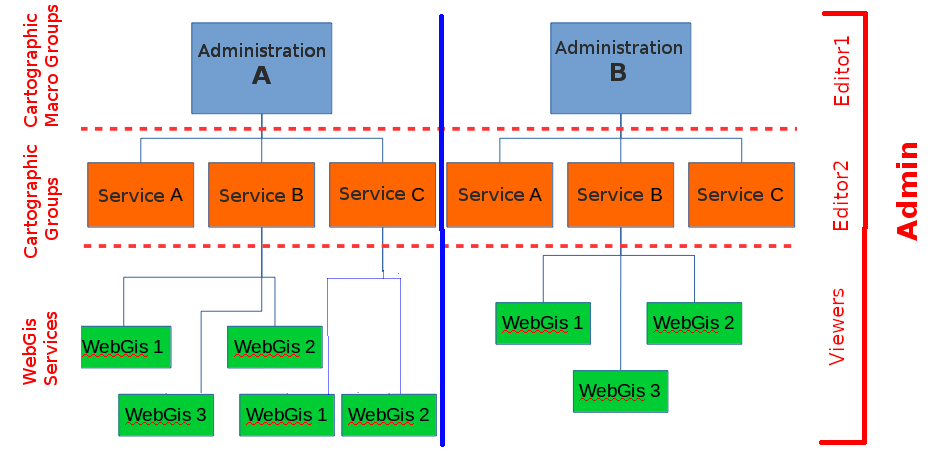
As previously specified, Editor 1 user will be able to:
create users (single and/or groups) of type Editor2 and Viewer
create Cartographic Groups within its Macro Group
publish WebGis services within his Cartographic Groups
activate specific modules on individual WebGis services
When Editor 1 user creates a Cartographic Group, he can define:
the eventual Editor2 user (individual/group) to associate with this Group
Viewers users (individuals/groups) who will have access to this container
Accessed the File Manager tool
As described in the previous chapter, the users who can access the FileManager are the following:
Admin role users
Editor1 role users
Admin role users will be able to access/edit/upload all the contents of the FileManager.
Editor1 role users (administrators of a specific MacroGroup) will be able to access/modify/upload only the contents present within a folder identified with the same user name as Editor1 itself.
The creation of a Editor1 role user (administrator of a MacroGroup) determines the automatic creation of a subfolder of the project_data folder with the same name as that defined for the Editor1 user.
This user will manage, independently, only the contents of that folder.
Again from the perspective of an infrastructure dedicated to a Union of Municipalities, this will allow each Editor1 (manager of one Administrations) to be able to independently manage the geographical data of their own Administration.
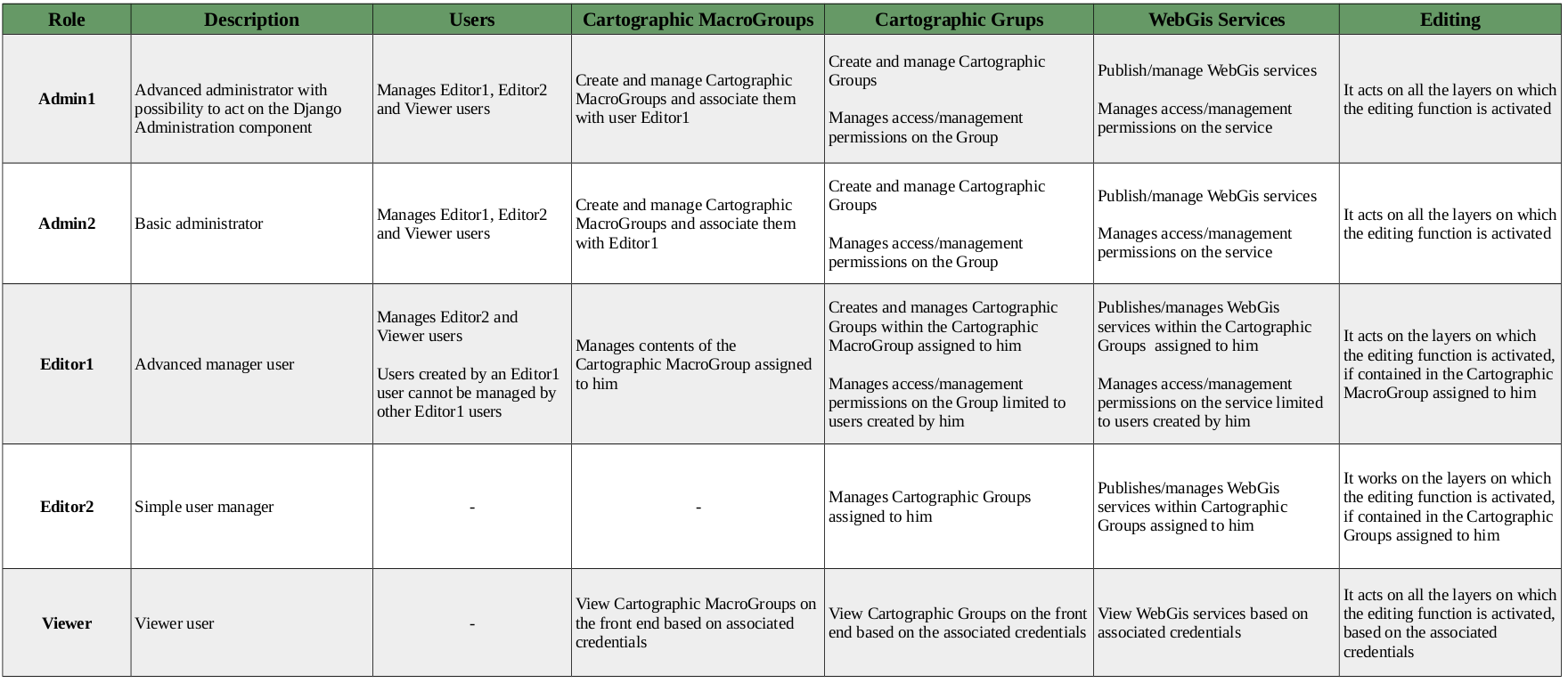
Summary table of access/administration policies
Below is a summary table of the powers associated with the different roles.
Examples of organization
Basic organization
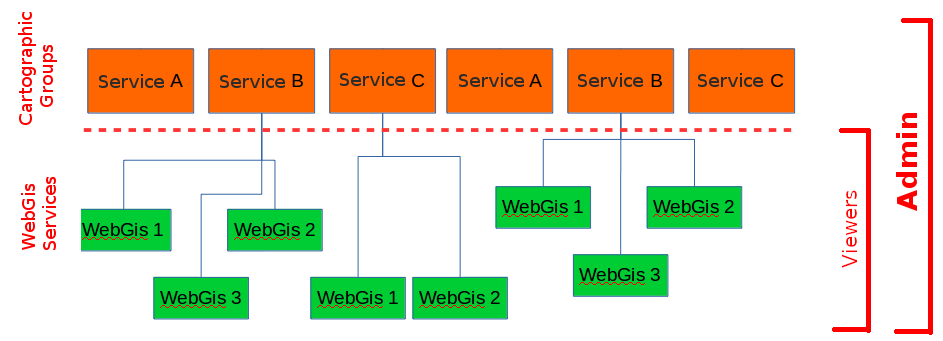
In this case the main administrator (Admin role) manages users, containers and all WebGis services Access to Cartographic Groups and individual WebGis services can be limited to system users (Viewer role) or to free access (Anonymous user)
Contents organized on a single level (Cartographic goups)
Contents organized on two levels(Cartographic Macrooups and Cartographic goups)
Medium organization
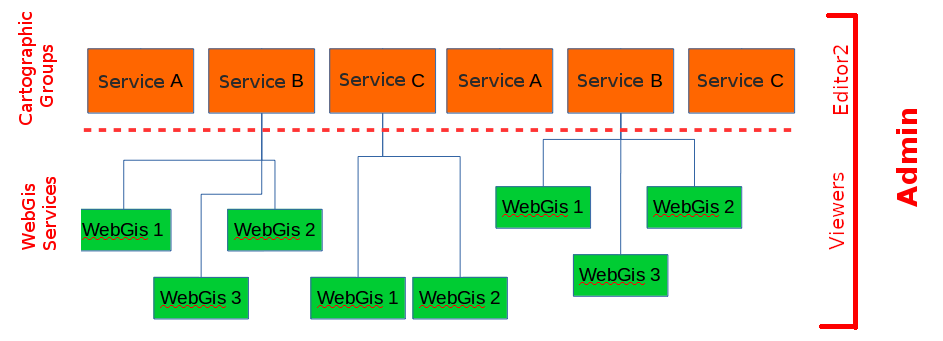
In this case the main administrator (Admin role) wants to delegate some secondary administrators (Editor2 role) in managing the contents (WebGis) of the individual Cartographic Groups.
User management will remain limited to the main administrator (Admin role)
Access to Cartographic Groups and individual WebGis services can be limited to system users (Viewer role) or to free access (Anonymous user)
Contents organized on a single level (Cartographic goups)
Contents organized on two levels (Cartographic Macrooups and Cartographic goups)
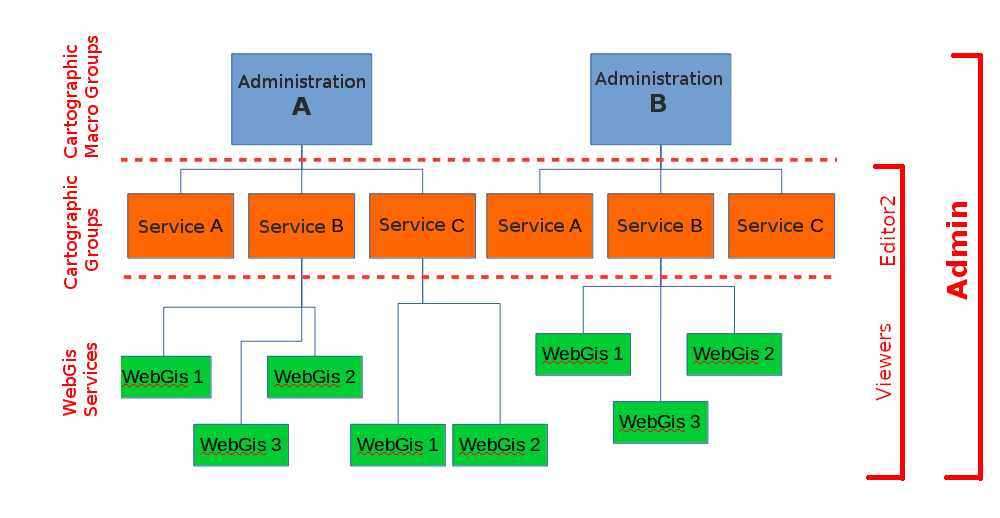
Advanced organization
The case in question involves the need to create completely distinct and separate subsystems with regard to not only the contents but also the users.
In this case, the main administrator (Admin role) delegates some secondary administrators (Editor1 role) in managing the contents of the individual subsystems identified by the Cartographic MacroGroups.
Editor1 users can in turn delegate some secondary administrators (Editor2 role) in managing the contents of the individual Cartographic Groups.
Editor1 users can create/manage users within their work environment (Macrogroup) ensuring separation from users created by other Editor1 users and related to other MacroGroups
Access to Cartographic Groups and individual WebGIS services can be limited to system users (Viewer role) or to free access (Anonymous user).
In this case, usually, the main administrator (Admin role) only takes care of creating the Macrogroups, the Editor1 users and associating them correctly